

Over my 20 years as a Systems Architect, I’ve audited hundreds of WordPress sites. Most founders and marketers spend thousands of dollars on content and backlinks, only to watch their traffic flatline because their technical foundation is a mess.
In the era of Generative Engine Optimization (GEO) and AI crawlers like ChatGPT and Perplexity, traditional SEO isn’t enough. AI bots are impatient. They don’t care about your beautiful design; they care about clean DOM structures, parseable data, and lightning-fast server responses.
If you want to rank in Google and appear in AI search engines, your technical infrastructure must be flawless. Here is the exact 12-point technical SEO checklist I use to build high-authority WordPress architectures.
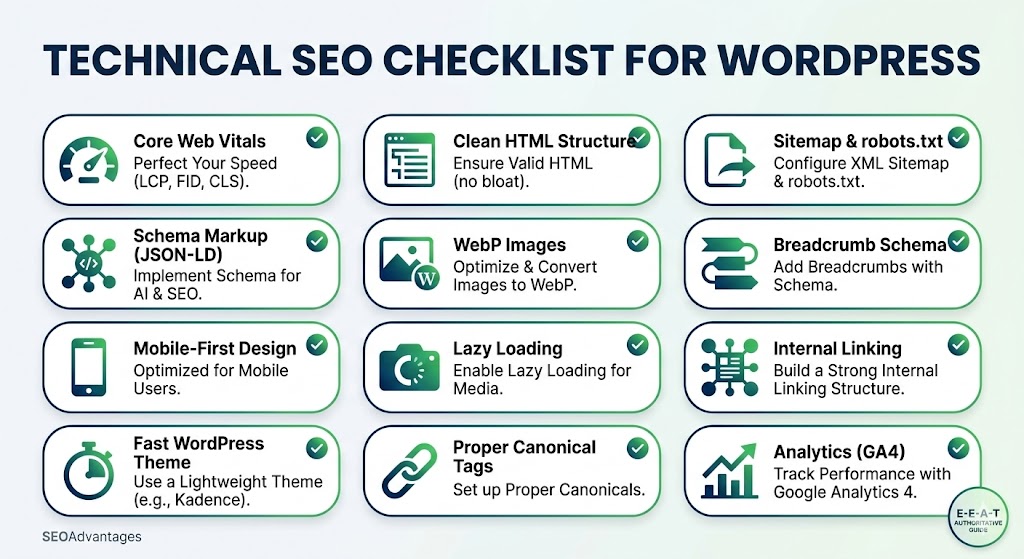
1. Perfect Your Core Web Vitals (LCP, FID, CLS)
Speed is a direct ranking factor for Google and a latency requirement for AI bots. If your Largest Contentful Paint (LCP) takes longer than 2.5 seconds, AI crawlers will often time out and pull data from a faster competitor. Optimize your server response times and eliminate render-blocking resources.
2. Ensure a Clean HTML Structure
Stop using heavy page builders that inject thousands of lines of useless <div> tags. A bloated Document Object Model (DOM) exhausts crawl budgets. Use strict, valid HTML. Keep your heading hierarchy (H1 to H6) perfectly nested so that AI models can build an accurate semantic map of your content.
3. Configure XML Sitemap & robots.txt
You must explicitly guide crawlers on what to index and what to ignore. A well-configured robots.txt file prevents bots from wasting time on your /wp-admin/ or dynamic cart pages. Submit a clean, updated XML sitemap to Google Search Console to guarantee immediate discovery of your pillar content.
4. Implement Schema Markup (JSON-LD)
This is the native language of AI. Implementing structured data is non-negotiable for modern search. Use Article, FAQPage, and Person schema to feed exact entities to LLMs. This removes all ambiguity about who you are and what your content solves.
5. Optimize & Convert Images to WebP
Serving heavy PNG or JPEG files is a rookie mistake. Convert every image on your site to next-gen formats like WebP or AVIF. This drastically reduces payload sizes without sacrificing quality, keeping your Core Web Vitals strictly in the green.
6. Add Breadcrumbs with Schema
Breadcrumbs do more than just improve user navigation; they build a clear internal hierarchy. Implementing breadcrumb schema allows search engines to understand the exact silo architecture of your site, passing authority seamlessly from category pages down to individual posts.
7. Optimize for Mobile-First Design
Google indexes the mobile version of your site—period. Your WordPress architecture must be responsive, with touch targets properly sized and no horizontal scrolling. If it breaks on a smartphone, it drops in the SERPs.
8. Enable Lazy Loading for Media
Never load off-screen images or iframes when a user first lands on your page. Native lazy loading defers the loading of media until the user scrolls near them. This simple tweak saves massive amounts of initial bandwidth and instantly improves page speed scores.
9. Build a Strong Internal Linking Structure
Don’t leave your pages isolated. A systems-level internal linking strategy distributes “link juice” and establishes topical authority. Connect your supporting articles back to your 3,000-word pillar guides using exact-match or highly relevant anchor text.
10. Use a Lightweight Theme (e.g., Kadence)
Your theme dictates your performance ceiling. Ditch the bulky multi-purpose themes. I exclusively build on lightweight, performance-optimized frameworks like Kadence or GeneratePress. They output minimal CSS and JavaScript, giving you the fastest possible baseline.
11. Set Up Proper Canonical Tags
WordPress tags, categories, and pagination can accidentally create hundreds of duplicate content issues. Setting proper self-referencing <link rel="canonical"> tags ensures search engines know exactly which version of a page is the master copy, preserving your ranking power.
12. Track Performance with Google Analytics 4 (GA4)
You cannot optimize what you do not measure. Deploy GA4 immediately to track user engagement, conversion paths, and event triggers. Ensure it is configured to filter out internal traffic and properly attribute organic growth.
The Bottom Line
A beautiful website built on bad code is a liability. By executing this technical checklist, you ensure your WordPress site is optimized not just for today’s Google algorithm, but for the AI-driven search engines of tomorrow.